Pocket Option Copy Trading
Click the button below to access the official Pocket Option platform and start using social trading. Below, you’ll also find a beginner guide on how to set up copy trading properly.
Risk warning: Trading carries high risk of losing your capital.

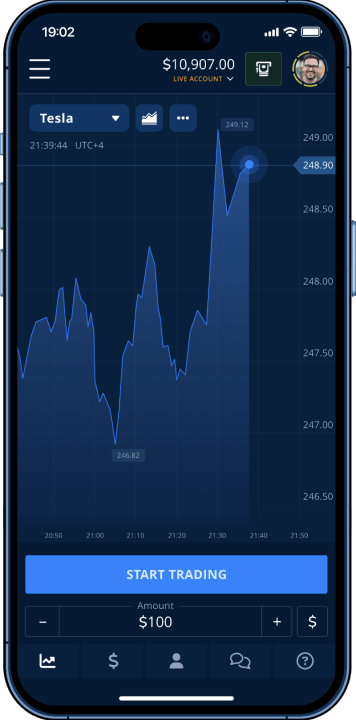
Pocket Option social trading changes how newcomers enter financial markets. Instead of spending months learning chart patterns and technical indicators, users can automatically copy trades from experienced traders. This guide explains how the system works, how to activate it, how to choose traders to follow, and how to configure settings to manage risk. You will also see common mistakes beginners make and how commissions affect real profits when using copy trading.
How Copy Trading Works on Pocket Option
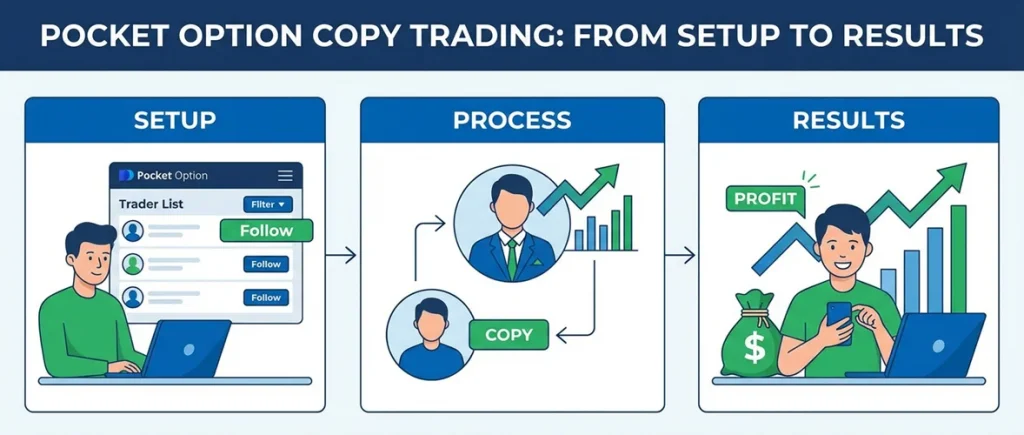
Copy trading is not unique to one platform. Across the industry, the same concept appears under several names: copy trading, mirror trading, auto-following, or social trading. The terminology differs, but the idea is the same. Traders can automatically replicate positions opened by more experienced participants. Platforms like Pocket Option simply include this feature as part of the broader shift toward social and automated trading tools.
At its core, the process is straightforward. Think of it like a relay race. A strategy provider opens a trade, and the Pocket Option system immediately detects it. The platform then checks each follower’s settings, including proportion percentages, minimum trade thresholds, and maximum limits. Based on these parameters, the system places appropriately scaled copies across connected accounts.
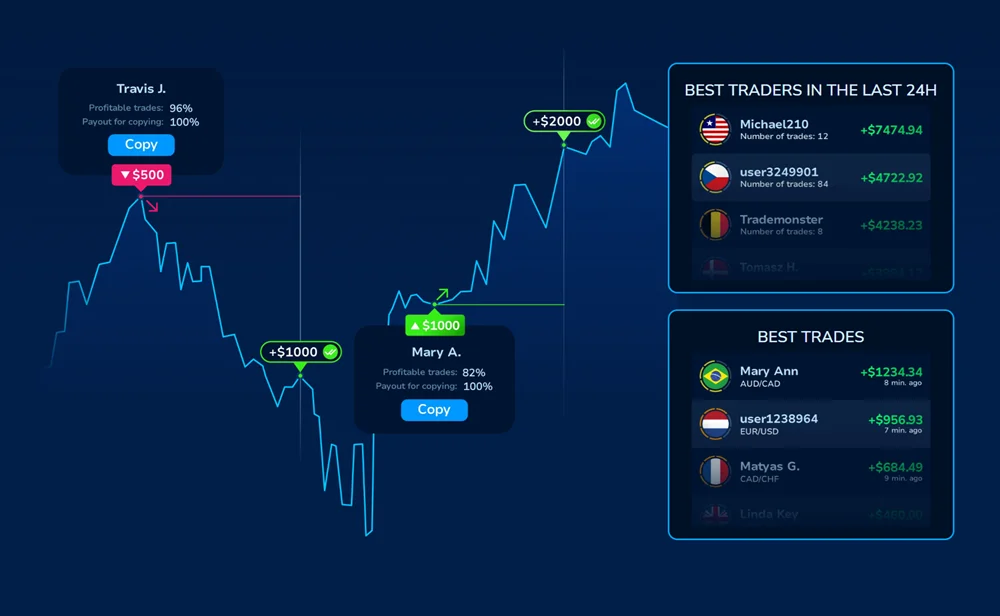
Trades can involve currencies, commodities, cryptocurrencies, or any other assets available on the platform.
When the trader you follow opens a position, the system automatically attempts to place the same trade on your account. This usually happens almost instantly. In most cases the delay is barely noticeable because the process is fully automated.
Small differences can still occur. Markets move constantly, so the entry price on the copied trade may not be exactly the same as the original one. This is normal in copy trading and happens on most platforms.
How Proportional Copy Trading Works
Proportional copying scales each provider trade to a size that fits your account. Set your proportion to 50% and a provider’s $100 trade becomes a $50 copy on your end. The math itself is straightforward; it’s the way your parameters interact that can trip people up.
| Parameter | What It Controls | Practical Example |
|---|---|---|
| Copy Proportion | Percentage of provider’s trade size to replicate | 60% turns $80 into $48 |
| Min Copy Trade Amount | Smallest trade the system will execute | Set at $5 ignores anything below |
| Max Copy Trade Amount | Ceiling for individual copied trades | $50 max caps larger signals |
| Stop Balance | Account level triggering automatic halt | $30 stops all copying when reached |
This is where beginners get caught out. Say a provider places an $80 trade. Your proportion is 60%, so you’d expect a $48 copy. But your maximum is $40. The system executes $40, not $48. Overlook that interaction once and your position sizing will start behaving in ways you didn’t intend.
How to Enable Copy Trading on Pocket Option
You’ll need a funded Pocket Option account to get started. While $5 is technically the minimum deposit, that amount doesn’t go far in practice. Split it across two providers and cover commissions, and your individual position sizes become almost negligible. Most traders find that $50-100 is the realistic starting point for copy trading to work properly.
Where to Find Social Trading on Pocket Option
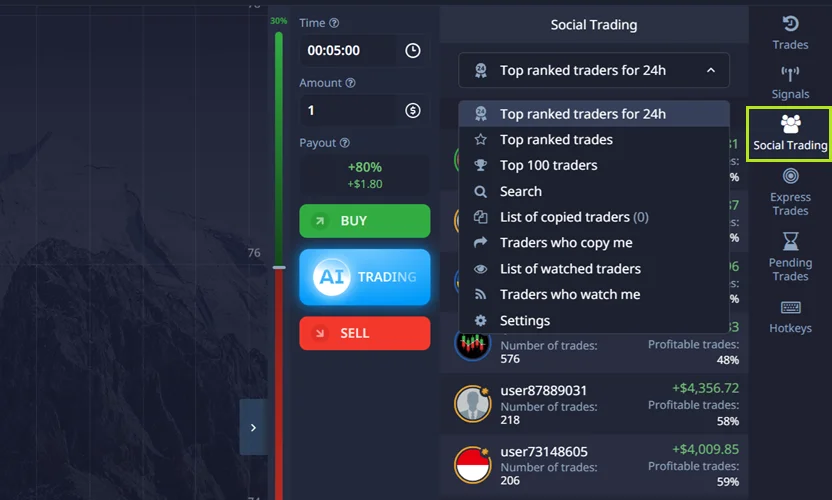
The Social Trading panel sits on the right side of the main trading interface. One click opens the trader directory: a live list of available providers showing their performance rankings, online status, and follower counts. There are two main views to choose from: Top 100 Traders for overall rankings, or Top Ranked Traders for the best performers from the last 24 hours. If you already have someone in mind, a search function lets you find them by nickname or ID number.
How to Set Copy Trading Parameters
Configuration happens before any copying begins:
- Open Social Trading from the main dashboard menu
- Scroll through available traders or search by ID
- Click any trader profile to examine their performance history
- Hit the “Copy” button — this opens the configuration panel
- Enter your copy proportion (start conservative — 30-50%)
- Define minimum trade amount ($3-5 works for most accounts)
- Set maximum trade amount (keep below 10% of total balance)
- Establish stop balance threshold (50-60% of starting capital)
Click “Confirm” to activate the connection
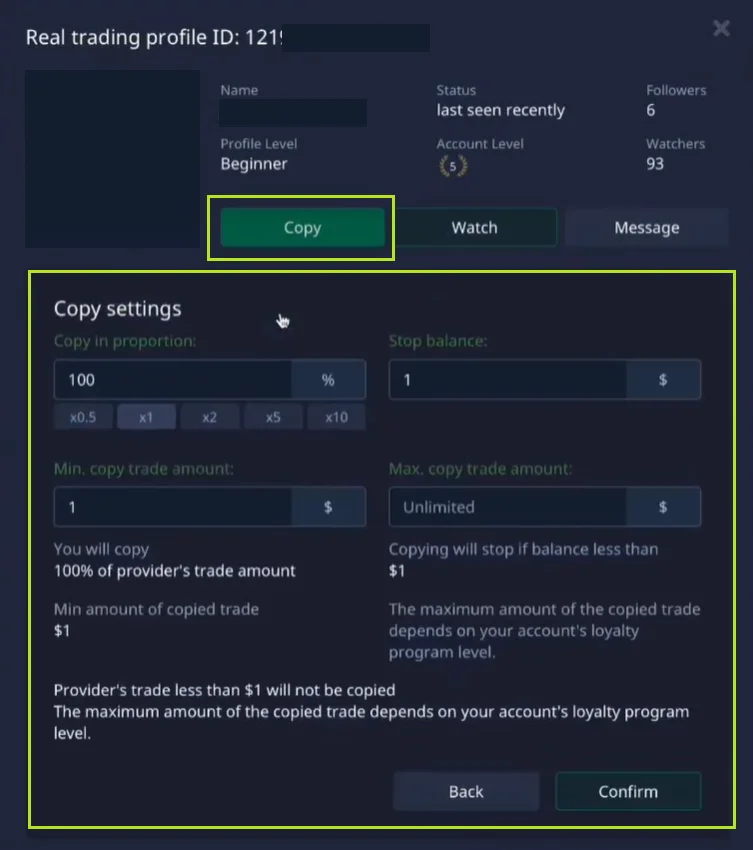
That stop balance setting is worth paying close attention to. Without it, a provider’s losing streak can drain your entire account before you even notice. Set it correctly, and copying halts automatically when you hit your floor, leaving you with enough capital to recover or switch direction.
What Happens When Your First Trade Is Copied
Once you confirm the setup, copying starts right away. The next time your chosen provider opens a position, a proportionally scaled copy appears in your account automatically. Your trade history flags these clearly as copied positions so you always know what you’re looking at.
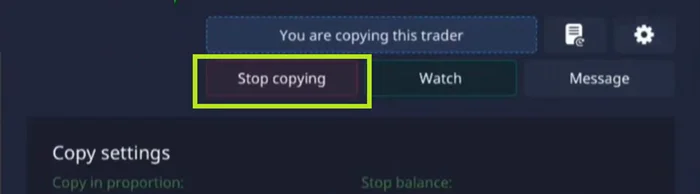
You can pause or stop copying at any time using the “Stop Copying” button in your copied traders list. There are no waiting periods or penalties.
Before putting real money in, it’s worth running through the process on a demo account first. Pocket Option provides virtual funds you can use to practice the full workflow.
How to Choose Traders to Copy
Who you copy matters more than almost anything else. Pocket Option displays detailed statistics for every signal provider, but those numbers can be misleading if you don’t know what to look for.
Key Statistics to Check Before Copying a Trader
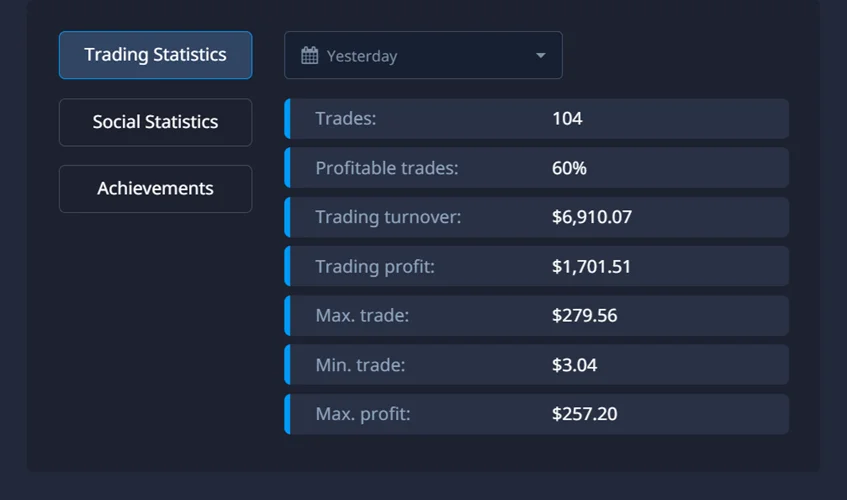
The Trading Statistics section breaks down historical performance across adjustable time windows: last week, last month, last three months. The key numbers to check are total trade count, win rate, and cumulative profit. The Social Statistics section shows follower dynamics, including current follower count, historical trends, and any platform achievements the provider has earned. When reviewing a profile, focus on the following:
Key metrics to examine:
- Win rate between 55-65% - anything above 70% sustained over months either indicates exceptional skill or data manipulation
- Sample size exceeding 100 trades — smaller samples prove nothing statistically
- Profit distribution across weeks — steady gains beat spectacular spikes followed by crashes
- Trade frequency matching your expectations — extremely active scalpers generate heavy commission loads
- Recent online activity — dormant providers offer no value regardless of historical performance
- Drawdown history — how much did they lose during their worst stretch, and how long did recovery take?
Red Flags to Watch When Copying Traders
A strong leaderboard position doesn’t automatically mean a trader deserves your capital. Once you know what to look for, red flags tend to surface quickly.
Huge gains packed into a single week are usually a sign of luck rather than skill. A provider who posts +120% in one week and then +3% over the following month almost certainly caught a favorable run that won’t repeat. Similarly, a large follower count paired with recently declining performance is a signal worth taking seriously: the strategy has probably stopped working, and more experienced followers have already moved on.
Providers who consistently use maximum position sizes on every trade are also worth treating with caution. Aggressive approaches can generate eye-catching short-term numbers, but a single bad week can undo months of gains in a hurry.
There’s also a known pattern of providers building impressive profiles by trading aggressively on demo accounts, then switching to a far more conservative approach once real followers come aboard. To guard against this, look for performance that holds up across genuinely different market conditions: trending phases, sideways consolidation, and high-volatility news events.
Why You Should Copy Multiple Traders
Concentrating everything on one provider is an unnecessary risk. Most experienced copy traders spread capital across three to five providers at once, allocating based on how confident they are in each and how their risk profiles complement each other.
| Trader Type | Typical Characteristics | Suggested Allocation |
|---|---|---|
| Conservative | 55-60% win rate, trades 2-3 times daily, small consistent gains | 40-50% of copy capital |
| Balanced | 60-65% win rate, moderate frequency, mix of trade sizes | 30-40% of copy capital |
| Aggressive | 65%+ win rate, high frequency, larger position variance | 10-20% of copy capital |
Mixing styles gives you a natural hedge. Trend-followers perform well when markets are moving directionally. Range traders do better when prices consolidate sideways. Running both together helps smooth out your equity curve over time.
Common Copy Trading Mistakes Beginners Make
Most new copy traders make the same setup mistakes. They’re all preventable, and catching them early can save you from real losses.
Why Copying Trades at 100% Is Risky
Copying a provider at 100% proportion seems logical at first glance. In practice, it’s a trap. A provider who risks 2% of a $10,000 account is placing $200 per trade. You copy at 100% with a $500 account, and suddenly that same $200 represents 40% of your capital. The dollar amount is identical. The risk profile is completely different.
The provider weathers five consecutive losses without much trouble. On your account, you might not make it past the third.
Common configuration failures include:
- Skipping stop balance entirely — nothing prevents account destruction during extended drawdowns
- Minimum amounts below $3 — commissions eat profits on tiny trades;
- Maximums exceeding 15% of account — single trades shouldn’t threaten account survival
- Copying three traders using identical strategies — feels diversified, concentrates risk
- Activating copies during major economic announcements — spreads widen, execution quality drops, slippage increases
How to Set Stop Balance and Trade Limits
Your stop balance should be set high enough to leave room for a real recovery. A threshold of 50-60% of your initial deposit is a reasonable benchmark: it stops a bad run before it becomes catastrophic, while still leaving you with enough capital to reassess and try again. If copying pauses automatically at that floor, consider it a feature rather than a frustration.
On trade sizing: minimum amounts below $5 will rarely justify the commission overhead. And your maximum per trade should cap single-position exposure at 5-10% of your total account value, tight enough to absorb a losing streak, but not so tight that individual positions become meaningless.
Example of Copy Trading Profit Calculation
Take a provider with a 65% win rate. You copy 100 of their trades over a month. The average winner pays $12; the average loser costs $10.
(65 wins × $12) − (35 losses × $10) = $780 − $350 = $430 profit
Now consider what happens during a tougher month. Same provider, same number of trades, but the win rate slips to 55%:
(55 × $12) − (45 × $10) = $660 − $450 = $210 profit
Still in profit, but the margin has shrunk considerably. The math makes clear how sensitive results are to win rate: a drop of ten percentage points nearly halves your monthly return. This is why provider selection and ongoing monitoring matter as much as the initial setup.
When to Stop Copying a Trader
No copy relationship lasts forever. Knowing when to walk away, and doing it before significant losses accumulate, is one of the most valuable skills a copy trader can develop.
Temporary Losses vs Strategy Breakdown
All traders go through losing periods. The real question is whether you’re looking at a temporary setback or a genuine breakdown in strategy. Temporary drawdowns tend to show a consistent trading pattern, a reasonable recovery timeline, and stable provider behavior. Strategy failure looks different: the trading pattern changes, position sizing becomes erratic, and the account stays underwater for an extended period with no clear sign of recovery.
Here are the clearest signs it’s time to cut ties:
These are the warning signs that matter most:
- Win rate below 50% for three straight weeks — short-term variance doesn’t last this long
- Sudden trade frequency spikes — often indicates revenge trading after losses
- Unexplained asset class changes — jumping from forex to crypto to commodities suggests confusion
- Provider going offline for days then trading erratically — personal issues may be affecting judgment
Rapid follower exodus — others see problems you might be missing
How to Stop Copy Trading on Pocket Option
Clicking “Stop Copying” cuts off new replication immediately. What catches beginners off guard is what happens next: any trades that were already open at the time you disconnected will keep running until they expire naturally. Stopping the copy relationship does not close those positions. You’ll need to monitor them manually until they close out on their own. If you want a clean break altogether, “Stop Watching” removes the provider from your observation list entirely.
It’s also worth remembering that copy trading doesn’t remove personal responsibility. Even when you’re following someone else’s strategy, the funds in the account are still yours, and any profit or loss ultimately belongs to you. Because of that, it’s a good idea not to rely on copying alone. Many experienced users combine copy trading with their own trades, using it as a learning tool while gradually developing their own decision-making and risk management.
FAQ - Social Trading with PocketOption
Yes, you can copy multiple providers at the same time, each with its own independent parameter settings. Most experienced users settle on three to five traders with complementary styles. Going beyond that tends to add administrative complexity without a proportional improvement in results.
New replication stops the moment you disconnect. However, any trades that were already open when you stopped will remain active until they expire naturally. The system doesn’t auto-close them. Keep an eye on that remaining exposure until everything has closed out on its own.
Open Social Trading and work through the Top 100 Traders or Top Ranked Traders lists. For each profile, look at win rate (55-65% is the healthy range), trade frequency, how consistent the profits have been across different market conditions, and drawdown history. Prioritize providers with at least 100 trades in their record over those with a single impressive streak. And weight recent activity more heavily than historical performance from months or years ago.
Copy trading lowers the barrier to entry for beginners since it doesn’t require any technical analysis skill. That said, you still need a working understanding of risk management, what each parameter does, and how to read a provider’s track record critically. The best way to develop those skills without financial risk is through the demo account. Jumping straight in without that preparation leads to avoidable losses, no matter how good the providers you choose turn out to be.
Yes, absolutely. Every trader has losing periods, and those losses show up in your account just as they would in theirs. If you’re copying someone with a 65% historical win rate, 35% of their trades will still lose. Drawdowns are a normal part of the process. Proper stop balance settings and conservative position limits give you protection against serious damage, but if you expect unbroken profits you’ll be disappointed. Grounded expectations will serve you far better than optimism.